Lost Tool Recovery
How to Recover Assets with QR Codes
Start Tracking NowIt’s 4:30 PM on a Friday. The job site is chaotic. Your crew is rushing to pack up before the weekend traffic hits its peak. In the flurry of activity—loading trucks, locking gates, and signing out—a heavy-duty hammer drill is left sitting behind a stack of drywall in the lobby.
Monday morning rolls around. The crew arrives at a new site across town. The foreman goes to grab the drill, and the realization hits: it’s gone.
Panic sets in. Was it stolen? Was it left behind? Did it end up in a subcontractor’s truck? You check your inventory software. It says the tool is "Assigned to Site A." You drive back to Site A, but the site is locked, or the drywall stack has moved. The tool is nowhere to be found.
In the construction and field service industries, this story plays out every single day. The cost isn't just the $500 replacement hardware; it is the downtime, the trip charges to buy a replacement, and the frustration of managing ghost inventory.
Most asset tracking systems fail at this specific moment because they rely on internal data. Your asset tag might say "ID: AGS-0126," but to a stranger who finds that tool, that string of text is meaningless. They don't have access to your database. They don't know who "AGS" is. Even if they wanted to be a good Samaritan, they have no easy way to return your property.
We built ToolWorks to solve inventory management, but today we are launching a feature that bridges the gap between your internal tracking and the outside world: Lost Tool Recovery.
The Problem: Passive Asset Tags Are Dead Ends
For years, the industry standard for asset tagging has been the passive barcode or QR code. These codes are excellent for checking tools in and out using a specific scanner app. They are reliable, durable, and efficient for your warehouse manager.
However, once that tool leaves your hands, a passive tag becomes a dead end.
If a site supervisor from another company, a security guard, or a property owner finds your lost equipment, they are often willing to return it. But if the tag only contains a serial number, the barrier to action is too high. They aren't going to spend twenty minutes Googling partial serial numbers or calling random manufacturers.
The result? Your expensive equipment sits in a lost-and-found box until it is thrown away, or worse, it "walks away" because there was no clear owner identified.
The Solution: The Public-Facing "If Found" Page
We asked ourselves a simple question: What if your asset tag could talk to strangers?
With the new Lost Tool Recovery feature in ToolWorks, your asset tags transform from passive identifiers into active recovery tools.
When you enable this feature, the QR codes on your equipment now serve a dual purpose:
- For your employees: Scanning the code with the ToolWorks app handles check-ins, check-outs, and audits just like always.
- For everyone else: Scanning the code with a standard smartphone camera opens a secure, branded Public Recovery Page.
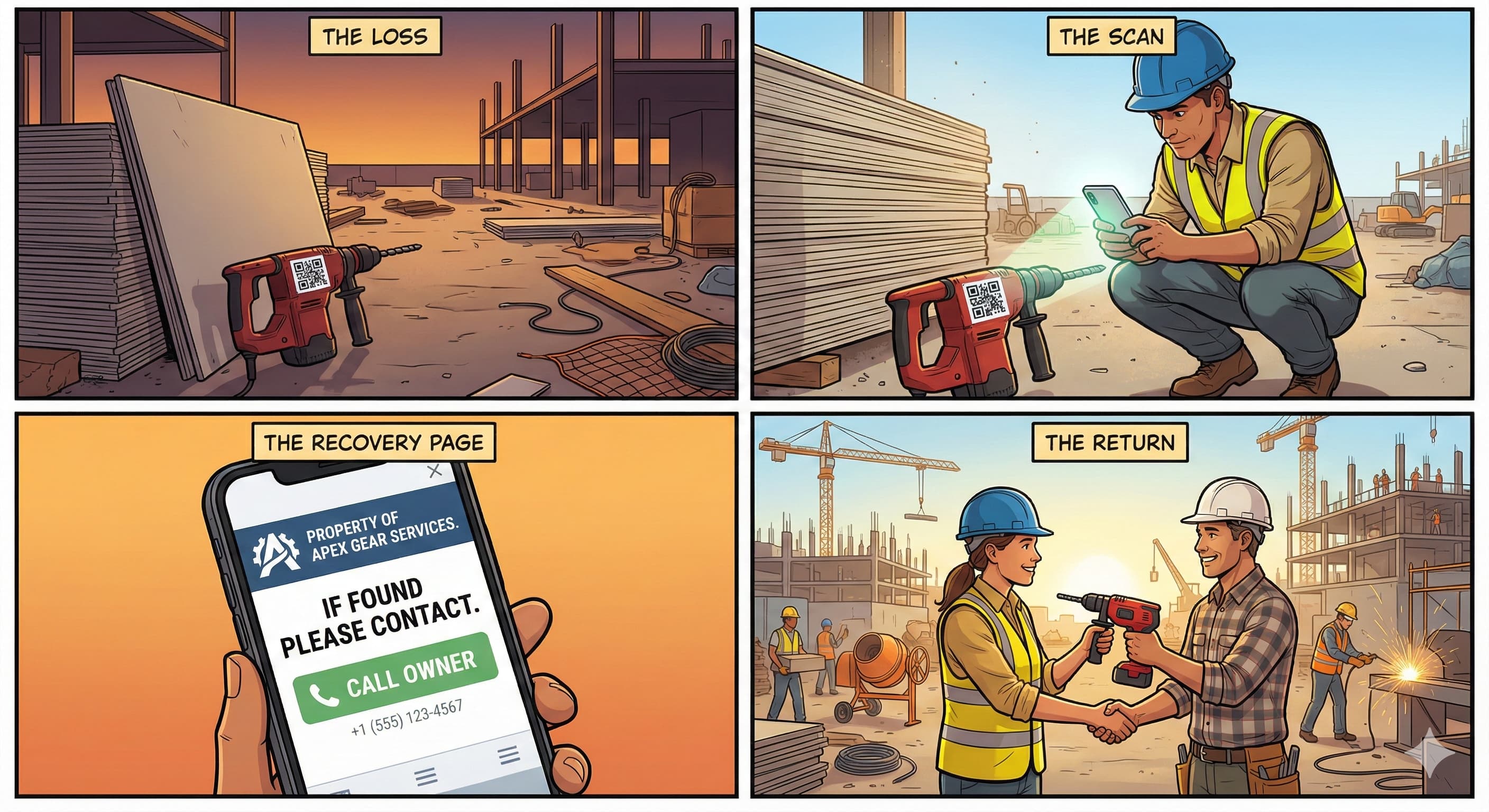
How It Works in the Real World
Let’s replay the Friday afternoon scenario with ToolWorks Lost Tool Recovery enabled.
The drill is left behind. On Saturday morning, the general contractor for the site walks through and spots the tool. They see the QR code label prominently displayed on the casing.
They pull out their iPhone or Android device and scan the code using their regular camera app.
Instantly, their phone browser opens a lightweight, professional webpage. It displays:
- Your Company Logo: establishing immediate ownership and trust.
- Your Company Name: "Property of Apex Gear Services."
- The Status: Confirms they have found a registered asset.
- Actionable Buttons: A large "Call Owner" button and an "Email Owner" button.
With one tap, the general contractor calls your office. "Hey, I found one of your Hilti drills in the lobby. I'll leave it with security."
You didn't have to drive back. You didn't have to buy a replacement. The barrier to recovery was removed because the tool itself told the finder exactly what to do.
Zero Friction for the Finder
The most critical aspect of this feature is friction reduction. We deliberately engineered the Recovery Page to be fast and accessible.
- No App Required: The finder does not need to download ToolWorks. They don't need to create an account or log in.
- Instant Load: The page is hosted on a high-performance Edge network, meaning it loads instantly even on job sites with spotty 4G cell service.
- Privacy First: The public page never reveals sensitive data. It won't show the tool's purchase price, purchase date, or the name of the employee it was last assigned to. It only displays the contact information you explicitly approve.
Setting Up Lost Tool Recovery
We have made the setup process incredibly simple for existing ToolWorks users.
1. Activate in Settings Navigate to Settings > Account in your ToolWorks dashboard. You will see a new section for "Lost Tool Recovery." Simply click "Turn On." Learn More
2. Verify Your Profile The system automatically pulls your company name, support phone number, and logo from your account profile. You can preview exactly what the finder will see before you go live.
3. Reprint Your Tags This is the most important step. If you have old asset tags on your tools, they need to be updated. Your old tags likely contain just the raw ID data. To activate the web-recovery features, the QR code needs to embed the full URL structure. Go to the Tool Tags Printer report in your dashboard to bulk-print new labels for your inventory.
4. (Optional) Custom URL
Do you already have a "Lost & Found" page on your corporate website? We support that, too. In the settings, you can choose to bypass the ToolWorks-hosted page and redirect all scans to a custom URL of your choice, such as yourcompany.com/report-lost-item.
The ROI of Recovery
Asset tracking software is an investment, and the return on investment (ROI) usually comes from accountability—knowing who has what. But Lost Tool Recovery adds a tangible, hard-dollar ROI to your bottom line.
Consider the math:
- Cost of a new hammer drill: $300 - $600.
- Cost of a generator: $1,000+.
- Cost of a total station: $15,000+.
Recovering just one significant asset pays for your labeling supplies and software subscription for the entire year. Furthermore, it projects professionalism. When a client or GC sees clearly labeled, digitally trackable equipment, it signals that your company is organized, modern, and values its resources.
Turn Your Tags Into Business Cards
Every tool in your inventory travels. It goes to job sites, sits in laydown yards, and rides in trucks. By enabling Lost Tool Recovery, you are effectively putting a digital business card on every single piece of equipment you own.
Don’t let your tools disappear into the void. Give them a voice, and give the people who find them an easy way to do the right thing.
Lost Tool Recovery is available today for all ToolWorks customers. Log in to your account to enable it, or contact our support team if you need assistance with bulk reprinting your labels.
Not a ToolWorks user yet? Start your free trial and see how easy it is to manage, track, and now recover your valuable assets.